
One accounting platform can support multiple behavioral health entities and Tax IDs while keeping each entity’s financial records distinct and giving leadership a consolidated view. The right behavioral health accounting systems also help allocate shared expenses consistently and connect financial reporting with billing and payroll workflows. Configure the structure around the organization’s legal entities, locations, and programs.
Managing separate books while maintaining organization-wide oversight can become difficult as a center grows, especially when revenue and expenses cross entity boundaries. A system should make those relationships visible without obscuring each entity’s financial position.
This article explains how multi-entity accounting works, what to consider when allocating costs, and how accounting connects with clinical billing and payroll. It also covers reporting by program, location, clinician, or fund, helping you assess the financial structure and system capabilities your center needs.
Key Takeaways
- Structure records so each entity’s financial activity stays distinct while leadership can review consolidated results across the organization.
- Use consistent reporting categories to understand performance by program, service, location, clinician, and fund.
- Set clear allocation rules for shared expenses, then connect accounting with billing and payroll workflows to reduce duplicate entry and improve financial visibility.
- Align financial systems with your center’s broader operational needs, including in-network contracting when payer participation is part of your growth plan.
Financial visibility and reporting by program, service, location, clinician, and fund
U.S. behavioral health providers must protect sensitive client information under HIPAA, according to the U.S. Department of Health and Human Services. Financial reports should also show revenue, expenses, and activity across programs, sites, clinicians, funds, and Tax IDs. Clear coding lets operators trace each total to its source.
Program and Site Financial Reporting
Build reporting categories around the services and locations your organization operates. For example, track outpatient counseling separately from intensive outpatient services, then assign each to its delivery site. This lets leaders compare revenue and expenses without blending distinct operations. Review the chart of accounts alongside reporting dimensions so a program’s costs remain visible, even when several programs share a location.
Clinician, Fund, and Tax ID Coding
Use consistent codes to connect transactions with the responsible clinician, program, site, funding source, and legal entity. For example, payroll assigned to a clinician should include the appropriate program and site dimensions while remaining associated with the correct Tax ID. Give each code a defined purpose and owner. Consistent setup supports traceable reports and helps prevent activity from appearing under the wrong entity.
Set coding rules before entering transactions, then apply them consistently to revenue, payroll, vendor costs, and adjustments. A practical review can compare a service report with its related revenue and assigned labor. If a clinician works across two programs, document how the associated activity is classified. This makes differences easier to investigate and keeps reports aligned with operational responsibilities.
Use fund codes to distinguish restricted or purpose-specific resources from general operating activity when needed. Keep fund labels consistent across transactions and reports, and define which income and expenses belong in each category. For example, leaders can review whether a program’s recorded spending corresponds to the fund assigned to support it.
Test reports using a sample transaction from each Tax ID, site, and program. Trace each transaction from its original entry through the relevant financial report, and confirm that clinician and fund dimensions appear correctly. This exposes coding gaps before leaders rely on consolidated summaries or make decisions using incomplete program-level results.
Integrations with clinical billing and payroll systems
Integrated workflows connect appointments, claims, payments, and ledger entries. They can also help organize insurer reimbursements, patient payments, and sliding-scale charges.
Billing Activity and General Ledger Posting
A practice management system can turn clinical appointments into billable claims and share information with financial operations. Map each claim’s billing activity to the appropriate general ledger accounts and entity records. Then reconcile posted charges, adjustments, and payments against billing reports. This helps teams trace how service activity becomes recorded revenue without entering the same information twice.
Claims, Revenue Cycle, and Payments
Useful workflows cover invoicing, insurance claims, payment posting, and financial planning. Track insurer reimbursements separately from client payments, then reconcile each against its related invoice or claim. For sliding-scale fees, apply the center’s established charge rules and record amounts consistently. Client portals can support copay payments and invoice access, helping reduce follow-up work on outstanding balances.
Connect clinical scheduling and billing data with accounting, then align payroll records with the same reporting periods. EHR integration can reduce duplicate data entry and improve billing accuracy and financial reporting. For payroll, define how labor costs are summarized and transferred to the ledger, then reconcile those entries against payroll records. Review exceptions before closing each reporting period.
Long-acting injectable workflows also need a clear connection between inventory records, administration, and billing documentation. Record the medication received, the amount used, and the associated service so staff can reconcile stock with claim activity. According to the Centers for Medicare & Medicaid Services, Medicaid programs must collect NDCs on certain physician-administered drug claims to receive federal matching funds and manufacturer rebates. Medicare requires the JZ modifier when no drug is discarded from a single-dose container.
For centers aligning these workflows, accounting and payroll systems can support a more coordinated financial structure.
Can one system handle several entities and Tax IDs?
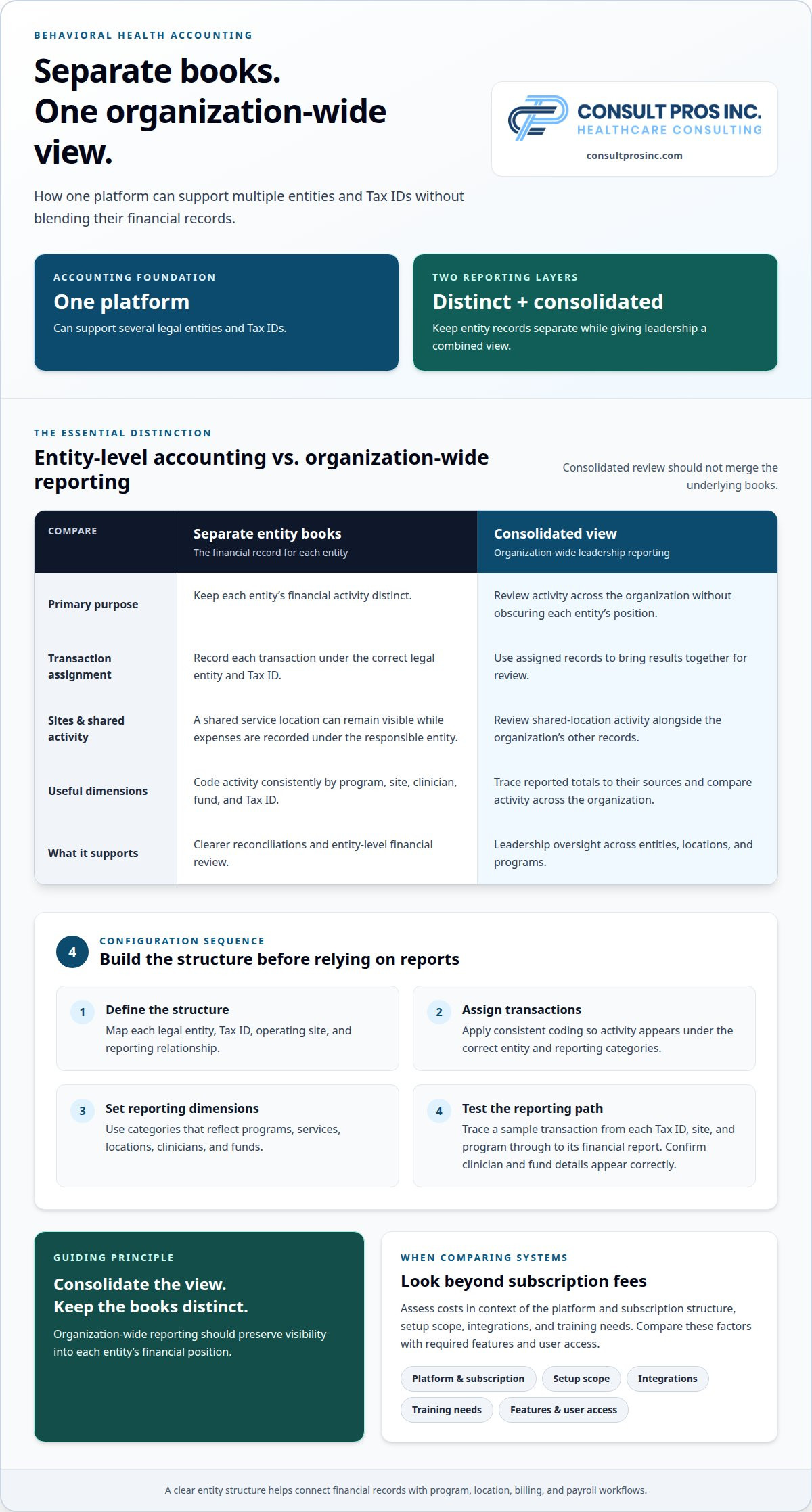
Yes. One accounting platform can support several entities if it maintains separate books and Tax ID records while allowing consolidated review. The essential distinction is entity-level accounting versus organization-wide reporting.
Software costs depend on the platform, subscription structure, setup scope, integrations, and training needs. Compare these factors with required features and user access rather than assessing subscription fees alone.
For multiple entities and locations, define each legal entity, Tax ID, operating site, and reporting relationship before configuration. Assign transactions to the correct entity, then use consolidated reports to review organization-wide activity without merging underlying books. For example, a shared service location can remain visible while its expenses are recorded under the responsible entity. This structure supports clearer reconciliations and entity-level financial review.
Journal exports need consistent account mappings, entity identifiers, and reporting periods. Before relying on an export, compare a sample journal entry with its source transaction and receiving ledger. Confirm that debits and credits balance, the correct Tax ID is attached, and site or program details remain available where needed. A failed mapping can place revenue or expenses in the wrong entity, so document export rules and review exceptions before posting.
Choose a system by documenting accounting needs, required features, integrations, pricing structure, and review criteria. During implementation, map the chart of accounts, establish entity records, configure user permissions, and test imports and exports with representative transactions. Train staff on consistent coding procedures, then reconcile opening balances before routine reporting begins. These steps make configuration decisions traceable.
Security and compliance risks include inappropriate access, exposure of sensitive information, and financial records that cannot be traced to their source. Set role-based permissions, limit access to necessary records, and review access logs and transaction histories. Assess how integrated systems transfer information, especially when clinical and financial records connect. Clear procedures for account changes and staff departures help protect access over time.
Automated expense allocation
Automated allocation applies documented rules to shared expenses, assigning each cost to the programs, sites, or entities that benefit. For example, a monthly software invoice can be divided among participating programs using a consistent allocation driver. The system should retain the original transaction and show how each assigned amount was calculated.
Start by separating costs that can be directly attributed from those that need shared allocation. Assign a clinician’s payroll expense to the program where the work occurred when records support that classification. For shared rent, define a suitable driver, such as the space each program uses. Apply each rule consistently, then document its rationale and owner.
- Direct costs: Assign a program-specific training invoice to that program.
- Shared occupancy: Allocate rent between sites using a documented space-use method.
- Central administration: Distribute shared support costs using a defined operational measure.
Configure each rule with its expense account, eligible entities, allocation driver, and effective period. Test it against a sample transaction before applying it broadly. For example, verify that a shared utility bill creates the intended entries for each location while preserving the original expense total. Keep the supporting calculation with the resulting journal entries.
Automation needs review controls. Compare allocated totals with the original invoice, investigate unexpected changes, and route exceptions to an assigned reviewer. If a program opens or closes, update its allocation eligibility and effective date before the next posting. Periodic review can also identify outdated drivers, such as a location-use assumption that no longer reflects operations.
For a practical implementation, document the rules first, configure the system second, and reconcile sample outputs before routine use. Set up accounting and payroll systems with allocation procedures that reflect your center’s operating structure.
Consult Pros: In-Network Contracting
Consult Pros Inc supports behavioral health organizations with In-Network Contracting as they prepare to participate in payer networks or structure operations around that goal. Consider this work alongside financial system planning, since payer relationships affect billing workflows and how centers assess revenue operations.
For organizations establishing their operating foundation, State Licensing & Certification and Facility Setup & Operational Structuring address related readiness needs. TJC & CARF Accreditation can also support centers pursuing accreditation as part of broader organizational development. These services complement the operational framework, while In-Network Contracting addresses payer participation.
To discuss In-Network Contracting or related operational support, contact Consult Pros Inc or visit consultprosinc.com.
Build a Financial Structure That Can Grow With Your Center
The next step is to turn your accounting design into a working operating framework. Assign clear ownership for system configuration, coding decisions, reconciliations, and periodic reviews so each process remains accountable as the organization changes. This governance helps ensure behavioral health accounting systems continue to reflect how your center operates, rather than becoming a record of outdated structures.
Before implementation or a major system change, identify the decisions leadership needs financial reports to support. Then align those needs with accounting workflows, payroll practices, and the organization’s legal structure. A disciplined setup gives staff a consistent process and gives leaders a clearer basis for planning as services or operations evolve.
Consult Pros Inc can help centers address accounting and payroll systems as part of their broader operational planning. Contact Consult Pros Inc about your accounting needs to discuss a practical next step for your organization. With the right structure in place, your team can move forward with greater clarity and confidence.
Frequently Asked Questions
Why Is Accounting Different in Behavioral Health?
Behavioral health accounting must reflect how services, staffing, and funding are organized across a center. A program may operate at multiple sites, serve different client groups, or receive funding with distinct reporting needs. Accounting procedures should preserve these distinctions in financial records. For example, leadership may need to review a program’s operating results separately from shared administrative activity to support internal planning and oversight.
What is behavioral health accounting software and what features should it include?
Behavioral health accounting software records and organizes an organization’s financial activity for operational review. Behavioral health accounting systems should support separate entity records, configurable account categories, program and site tracking, expense allocation, and financial reporting. Useful controls include role-based access, transaction histories, reconciliation tools, and exports that preserve account mappings. Evaluate these functions against your center’s workflows, including how staff review adjustments and prepare period-end reports.
What are the best accounting systems for behavioral health practices and organizations?
The best-fit system is the one that matches the organization’s structure and reporting responsibilities. A single-site practice may prioritize straightforward bookkeeping, while a multi-entity organization may need separate records and consolidated oversight. Compare reporting dimensions, integrations, access controls, export processes, and usability. Test realistic scenarios during evaluation, such as reviewing one program’s expenses or tracing a transaction from its source to a financial report.
How do accounting systems for behavioral health compare with general healthcare accounting software?
The distinction depends on configuration, not just the software label. General healthcare accounting tools may support core financial management, while a behavioral health organization may need reporting categories for its programs, sites, funding, and clinician activity. Compare how each system represents your operations and produces the reports leaders use. Test actual workflows rather than relying on broad product descriptions.
Can behavioral health accounting systems integrate with EHR, practice management, payroll, and payment platforms?
Yes, integrations can connect financial records with clinical, administrative, and payment workflows when data fields and account mappings align. For example, an organization can define which system owns appointment details, payroll entries, and payment records, then establish how relevant information transfers. Test common transactions and exceptions before relying on automated exchanges. Clear ownership helps staff identify which platform holds the authoritative record when information differs.